
Every new account is a cause for celebration and the beginning of a journey — and it’s up to account managers to grow revenue from existing customers over time. Juggling accounts, best practices, and company goals is a tall order, which is where account management software helps.
The best account management software helps you keep accounts in order and run sales processes more smoothly to easily onboard more clients and maintain existing relationships.
This buying guide explains what account management software is, how it helps businesses outperform the competition, and which tools to consider adding to your tech stack this year.
What is account management software?
Account management software organizes and automates work to help account managers establish, maintain, and grow customer relationships to increase retention and revenue.
Most companies handle account management as part of their customer relationship management (CRM). Still, not all CRM software tools have robust account management functions.
Account management tools can typically:
- Manage contacts by consolidating customer information from various apps
- Organize multiple contacts within a single customer account
- Visualize deal management lifecycle
- Assign accounts to the correct managers
- Track account health or sentiment
- Manage renewals
- Forecast and track account analytics
It’s important to note that account management and accounting software are different. Account management apps support customer relationships, while accounting software organizes company finances.
Account management and customer success are also two different disciplines. If you’re a customer success manager, check out our guide to the best customer success tools.
How account management tools benefit your entire revenue team
Researching a new tool and getting your team on board is a big project, but the effort is worth it. Here’s why.
Keep track of your growing customer base
Imagine you’re in charge of managing 10 accounts — but each account has three contacts, and account data lives across three tools. No Excel spreadsheet template in the world lets a team quickly update and reference that much information. As your customer base and company grow, an account management app consolidates data into a single, collaborative platform.
Putting valuable information at account managers’ fingertips helps them make informed decisions without wasting time moving between apps.
Deliver a better customer experience to strengthen relationships
It’s easy to gravitate toward an acquisition-focused growth strategy, but growth through sales alone isn’t sustainable forever — especially when 96% of business leaders plan to cut costs in 2023.
Account management tools with automation allow teams to deliver a consistent customer experience. Growing existing relationships supports revenue at a time when your target audience may be wary about adding new vendors to the mix. Being a supportive business partner to clients could also keep your company safe from their budget cuts.
Use AI to catch opportunities (and issues) faster
Gartner research revealed that sales teams’ product portfolios have more than doubled in recent years. The pressure to drive revenue-focused metrics doesn’t slow down as account managers have to learn and recommend new features, though.
AI in account management can help identify what tactics deliver results, highlight at-risk accounts, find growth opportunities, and share insights across the team. Having a strategic AI partner helps account managers prioritize their effort and attention to maximize returns.
How to evaluate account management software
Take a moment to consider what you need to have (and what would be a nice bonus) to identify apps that will deliver the best ROI for your specific company.
Here are a few steps to help evaluate your options.
1. Identify your top account management goal
Start by asking yourself why you want an account management tool now. Did something in your team, company, or industry change? Are there goals or metrics you’re falling short on where account management features would help? While you can plan to grow with an app in the future, start with a single goal for your tool, like:
- Increase retention through omni-channel automation
- Identify upsell and cross-sell opportunities using account health scores
- Improve contact management with integrations
2. Review special considerations in your company
Many account management software apps have a similar feature set, but the details may help you decide. For example, do you need market segmentation for a nationwide company? Or do you want to create automated pipelines for different customer segments? Write down unique elements of your team, including:
- Team size
- Account management organization
- Industry
3. Consider your current tech stack
Buying an account management app is an investment, so it needs to play nicely with your other tools. Consider whether the app has native integrations with your other apps or if you’ll need to use an API or automation tool like Zapier. You may want your account management app to integrate with your:
4. Talk to your sales teams
As you research account management tools, you might notice some overlap with the best sales automation tools. Before you advocate for buying a tool that might overlap with another CRM your company pays for, talk to the sales team about what apps they use.
Using the same tool for sales pipelines and account management makes account handoff easy and secure.
If you want to use different software than the sales team, make sure the two apps integrate and start with a free trial or account. If you start small with an account management app that the sales team can use, you might be able to recruit another team to your preferred platform.
5. Check reviews and usability
Unfortunately, an app can look great on paper but be frustrating in action. Read reviews, watch demos, check out customer stories, and ask questions about:
- Technical requirements
- Implementation and customization
- UX design
- Use cases in your industry
What are the top account management tools?
There’s a lot to consider when shopping for a new account management solution, so we’ve talked to account managers and consulted reviews to show you where to start your search.
Here are nine of the best account management tools in 2023 (in no particular order).
1. HubSpot Sales Hub and Service Hub
Business pricing: Starts at $45 a month
Free trial: No
G2 rating: 4.4/5
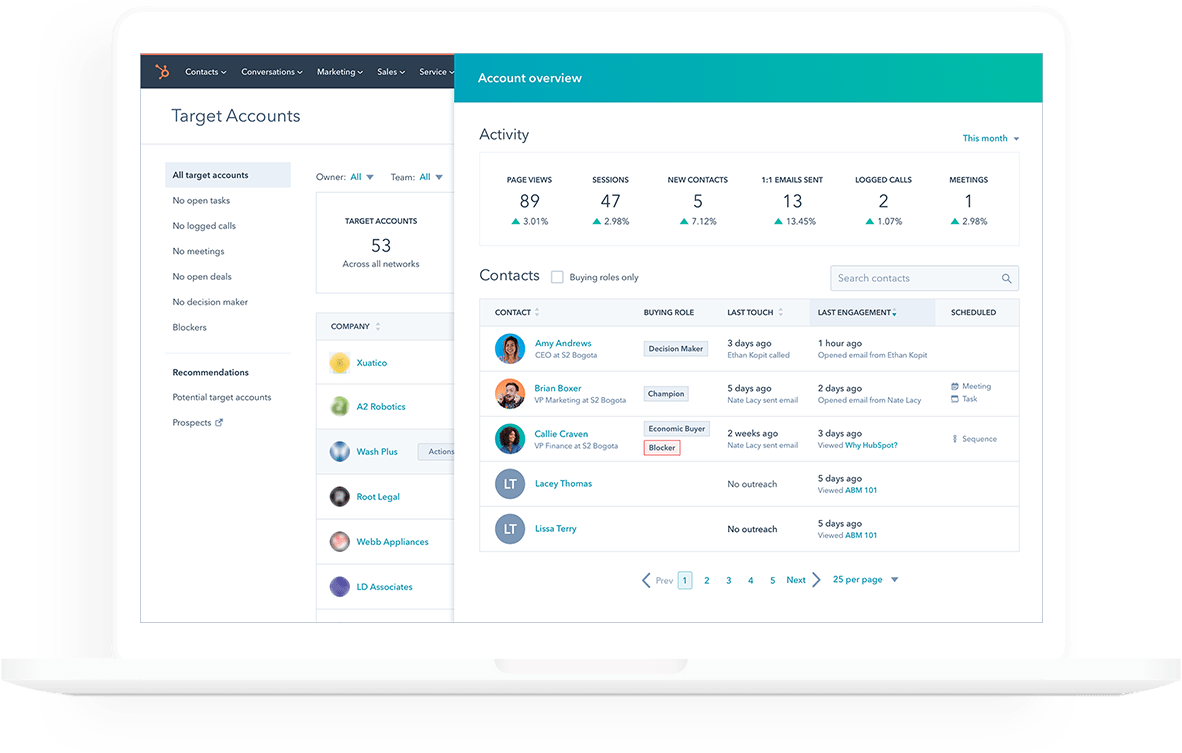
HubSpot is a SaaS giant, partly because of its wide range of tools. HubSpot has five core products: Marketing Hub, Sales Hub, Service Hub, Operations Hub, and CMS Hub. While teams can use the Sales or Service tools for account management, some users recommend Sales Hub for account management.
HubSpot may be a good fit for your account management team if your marketing or support teams already use it, or if your company is willing to move everyone to the same platform for easier collaboration.
Features
- User permissions
- SLAs
- Net promoter score (NPS) surveys
- Support ticket pipelines
- Email sequences
- Customizable sales reports
- Automated email series and tracking
- AI conversation insights
- Sales document management
- Chatbot builder
Pros
- Has a suite of tools to collaborate across teams, including marketing automation and sales management
- Offers onboarding and consulting services plus product and strategy education
- Integrates with Calendly to update HubSpot when an account interacts with a Calendly meeting
Cons
- May require technical support for advanced customization
2. Microsoft Dynamics 365
Business pricing: Starts at $65 a month
Free trial: No
G2 rating: 3.8/5
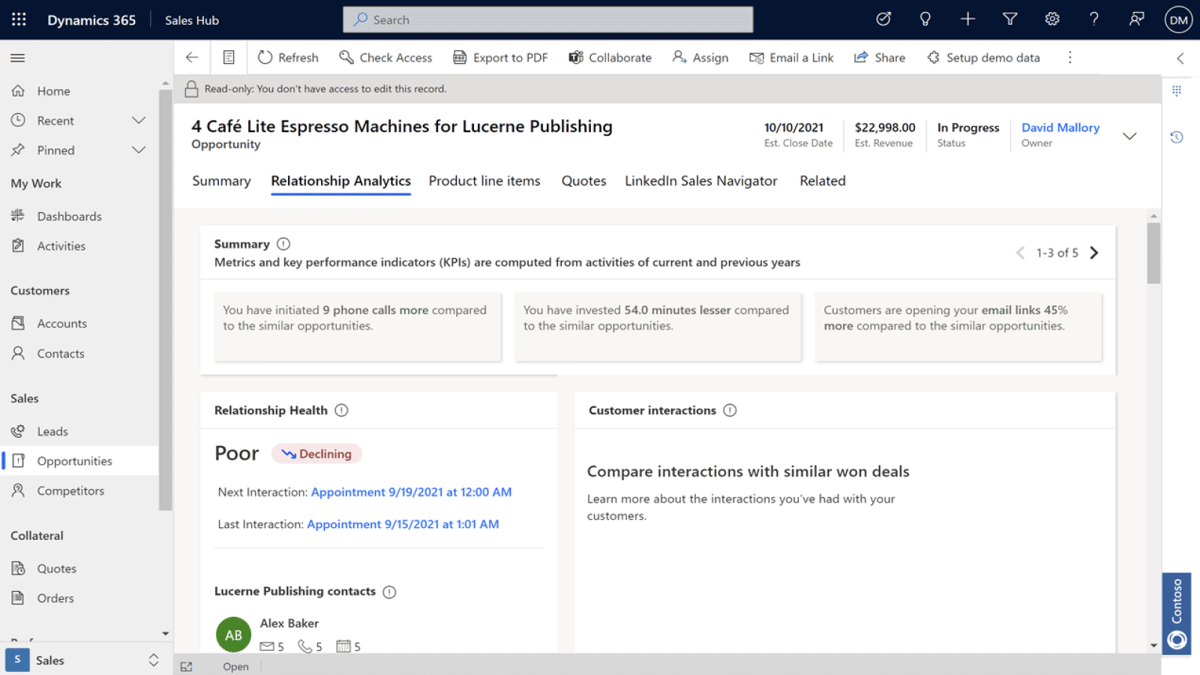
If your organization already uses Microsoft products, Microsoft Dynamics 365 is a suite of tools that feels familiar and integrates with your existing tools. Features like AI-supported account health scores and suggested next steps help teams quickly make decisions.
A review from an e-learning company shared, “[Dynamics 365 Sales] enables sales teams to leverage familiar tools and workflows, improving productivity and collaboration. For example, users can access customer data and sales insights directly within Outlook, enhancing efficiency and reducing context switching.”
Features
- Omnichannel customer communication, including email, conversational AI, and self-service
- AI-powered customer predictions
- Customer health scores
- Sales automation
- Team scoring and coaching
- Pipeline dashboards
Pros
- Integrates with Microsoft products like Office 365, Outlook, and Teams to manage accounts where you already work
- Has more AI-powered insights than some other tools
- Integrates with Calendly to update Microsoft Dynamics when an account interacts with a Calendly meeting
Cons
- Tricky to integrate with non-Microsoft tools
- Long implementation and learning curve due to the robust features
3. Salesforce Sales Cloud
Business pricing: Starts at $75 a month
Free trial: No
G2 rating: 4.3/5
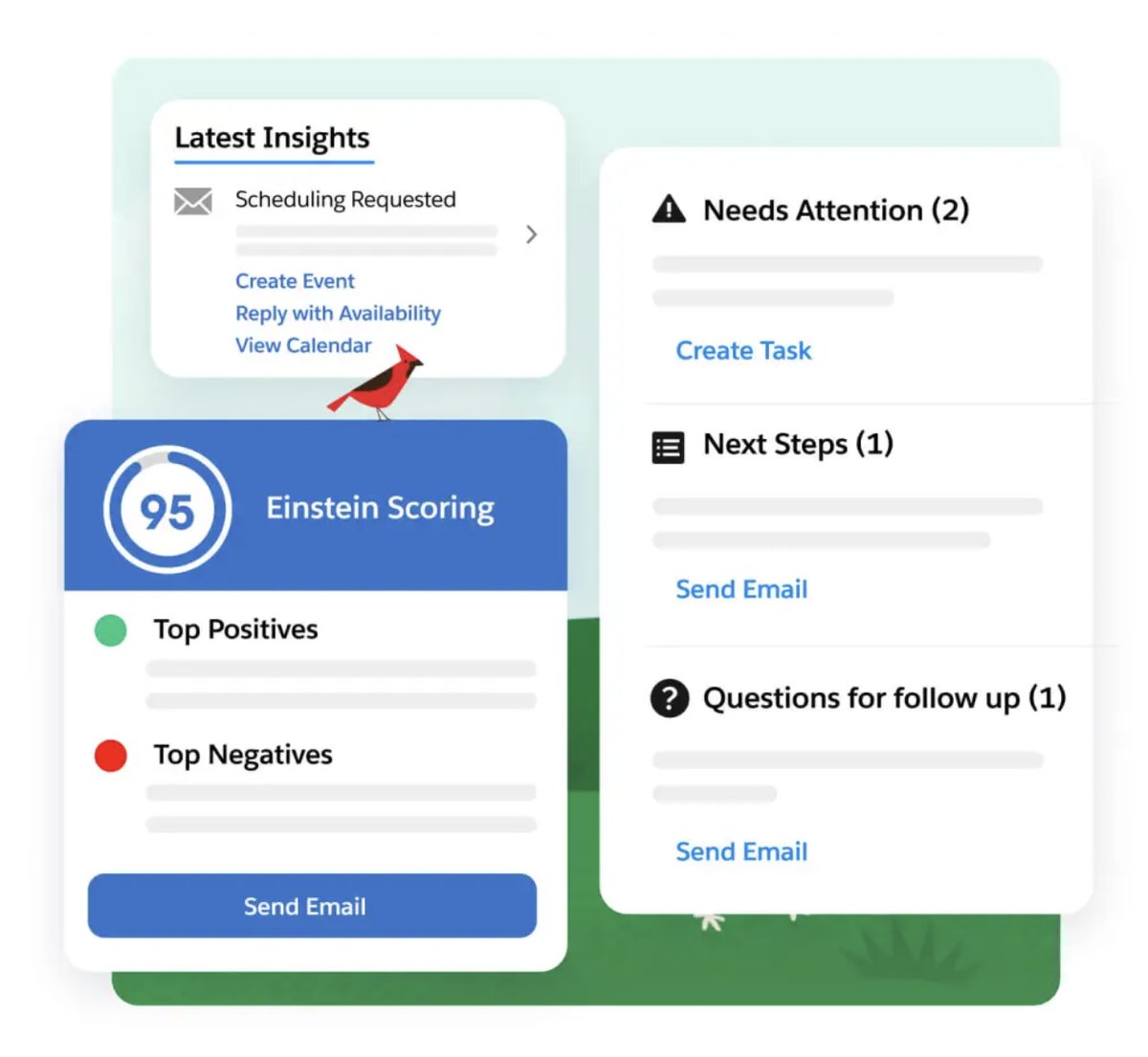
Rich with features, Salesforce Sales Cloud is the CRM that works within the overall Salesforce system of marketing and e-commerce apps. Its best features are ease of use and adaptability. You get separate tabs for accounts, leads, and opportunities, but the interface is consistent.
Salesforce Sales Cloud also shines in terms of analytics. Sales Cloud Einstein Lead Scoring uses advanced AI to qualify each lead and give you actionable insights based on your sales and account data.
Features
- Lead management
- Custom assignment
- Opportunity monitoring
- Forecasting
- Territory management
- Sales planning templates
- Customer filters and segments
- Custom rep assignments
- Automated renewals
- Customer retention and growth metrics
- AI insights
Pros
- Has advanced analytics and insights
- Integrates with other Salesforce products to work across teams
- Integrates with Calendly to update Salesforce when an account interacts with a Calendly meeting
Cons
- May require technical support for advanced automation setup

9 pro tips to shorten your sales cycle with Calendly
Follow these tips to close deals faster and give your team more time for what matters most: building relationships that drive revenue.
4. Zendesk Sell
Business pricing: Starts at $19 a month
Free trial: 14 days
G2 rating: 4.2/5
Zendesk Sell is an intuitive CRM and account management software for teams on the go. Its main standout features are its mobile app and voice call functionality, which make it easier for distributed teams to manage accounts.
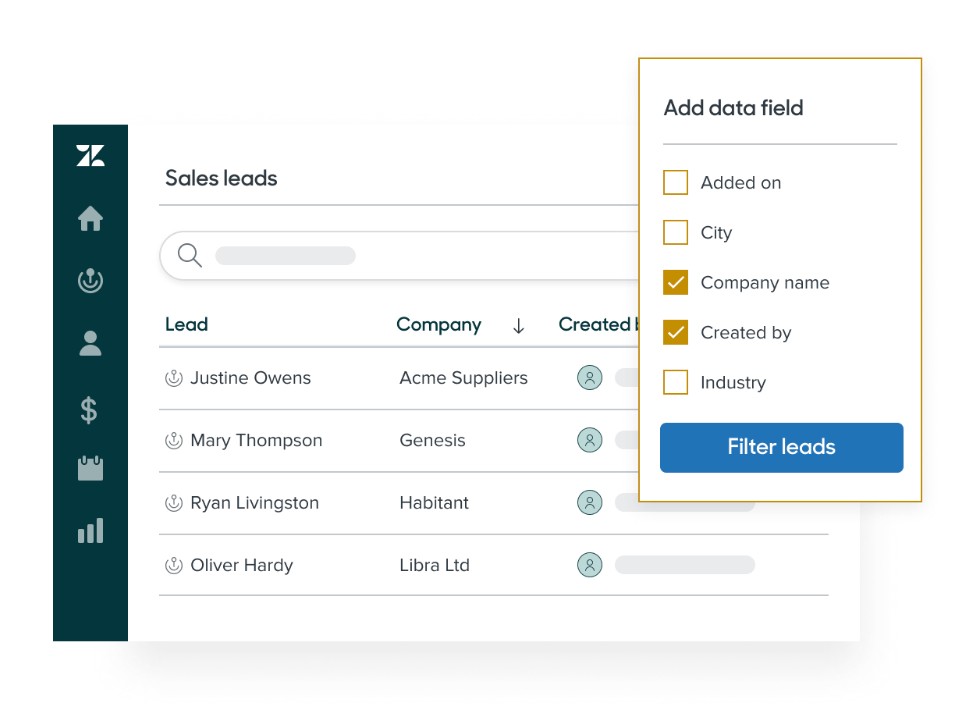
With Zendesk Sell, reps can access all available information about an account, including who has made inquiries about products or product types. Drag-and-drop functionality lets you quickly move a deal to the next stage, and account syncing means that everyone can see contract statuses.
Another key feature of Zendesk Sell is Smart Lists, which lets you filter and segment leads using the most current information. Reps also can find essential data on their individual sales dashboards, which provide insights like revenue by pipeline and monthly goal progress.
Features
- Sales engagement tools
- Smart list lead filters
- Pipeline analysis
- Custom dashboards
- Goal tracking
- Call analysis
- Round robin distribution
- Email sentiment analysis
- Notifications
- Mobile app
- Account syncing
Pros
- Has sales and service tools on the same platform for cross-team collaboration
- Is easier to customize than some tools because of drag-and-drop features
Cons
- Has some integration issues, according to users
5. Zoho CRM
Business pricing: Starts at $23 a month
Free trial: 15 days
G2 rating: 4/5
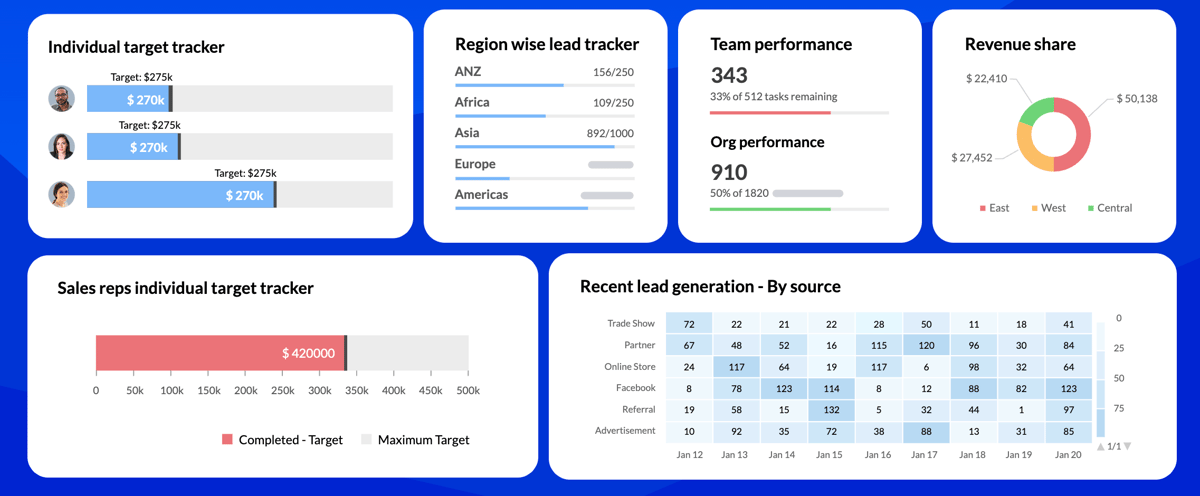
Zoho CRM is account management software with a customizable CRM with extra features like sales process rules to customize rep assignment and suggestions on which repetitive tasks you can automate. The app also has templated and customizable reports to compare performance metrics with spreadsheets, time-based cohort, and correlation diagrams.
Features
- Workflow automations
- Contact management
- Custom sales rep assignment
- Custom data review
- Drag-and-drop sales journey builder
- Customer journey discovery tool
- Real-time reporting
- Territory management
- Gamification
- AI predictions
Pros
- Intuitive and customizable module-style interface
- Mobile app
- Integrates with Calendly to update Zoho when an account interacts with a Calendly meeting
Cons
- Has less pipeline customization than you’d get with some other account management software tools
6. Bitrix 24
Business pricing: Starts at $49 a month
Free trial: No
G2 rating: 4.1/5
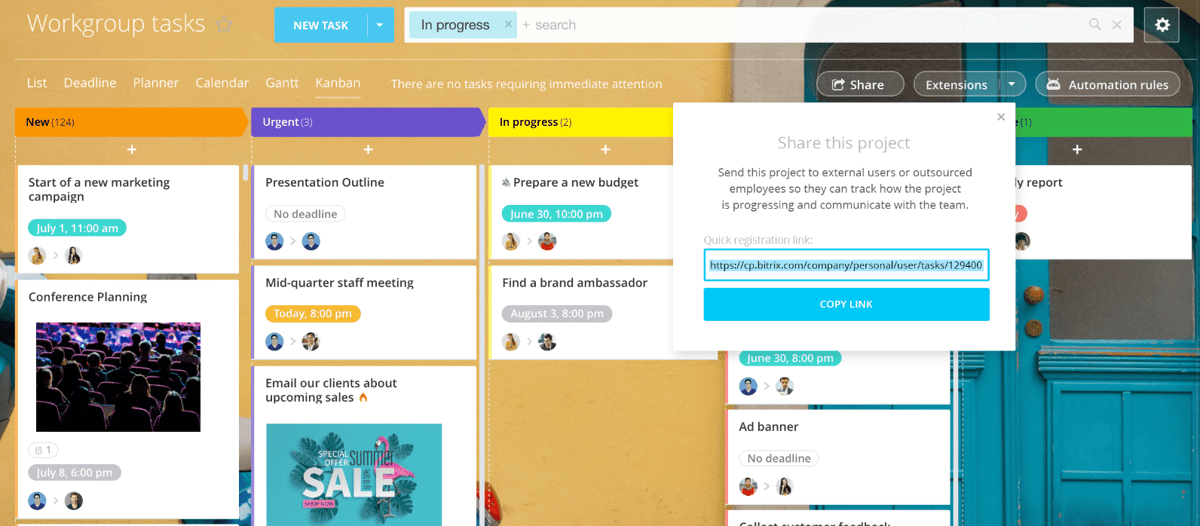
Bitrix24 is an account management tool with a collaborative dashboard you can use for project management. For your internal team, it provides chat, videoconferencing, and document sharing.
Bixtrix24’s CRM has features like visual pipeline management, custom deal stages, and sales funnel automation. You’ll receive lead qualification tools and advanced reporting to help you manage your accounts.
Features
- Workflow automation
- Project management
- Shared workspace for documentation
- Custom sales pipeline
- Reporting
- Lead qualification
Pros
- Has some drag-and-drop customization
- Includes a communications hub
Cons
- Has fewer native integrations than some other account management tools
7. Pipedrive
Business pricing: Starts at $14.90 a month
Free trial: 14 days
G2 rating: 4.2/5
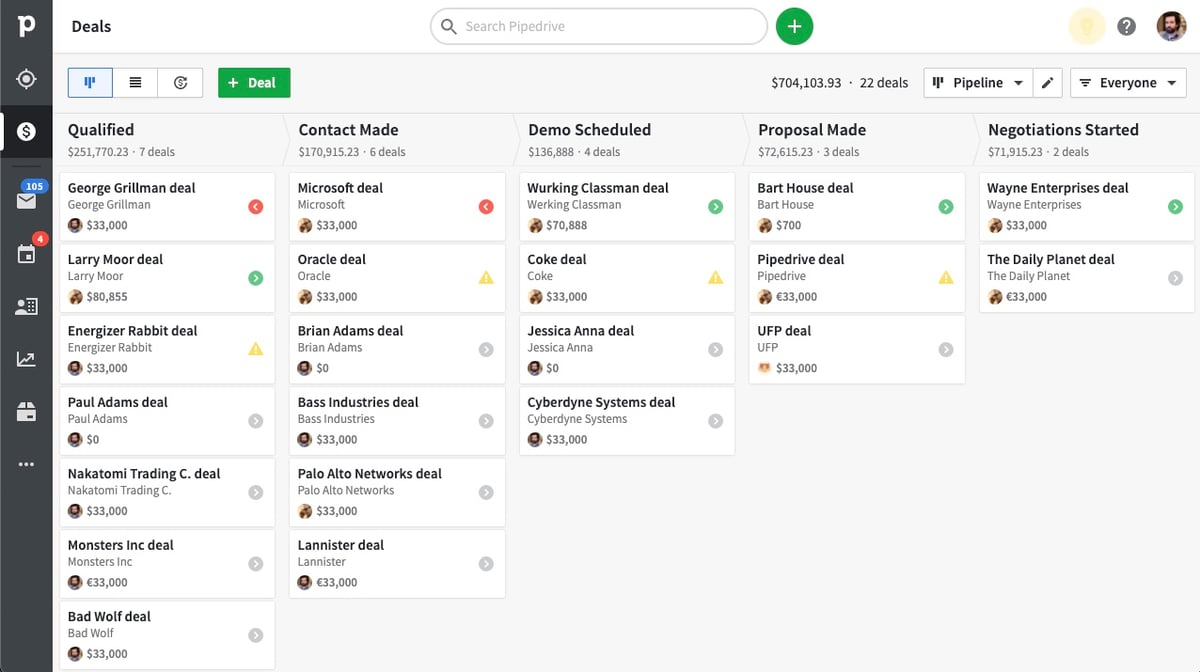
Pipedrive is a pipeline-focused CRM. Teams can create a sales funnel from scratch or use a template, automatically track progress, and automate admin work. Pipedrive also has analytics and AI to help you spot opportunities. Users appreciate the consolidated sales and account management information in an easy-to-customize dashboard.
G2 customer reviews emphasize how easy it is to move things around Pipedrive to customize your pipeline.
Features
- Custom sales pipeline automation
- Performance tracking
- CRM dashboard
- Email tracking
- Contact history
- Real-time reporting
- Forecasting
- Segmentation
- Email marketing
- AI insights
Pros
- Has a “Smart Docs” add-on to track interactions with documents
- Integrates with Calendly to update Pipedrive when an account interacts with a Calendly meeting
Cons
- Has limited branding customization, according to some users
8. Apptivo
Business pricing: Starts at $10 a month
Free trial: 30 days
G2 rating: 4.3/5
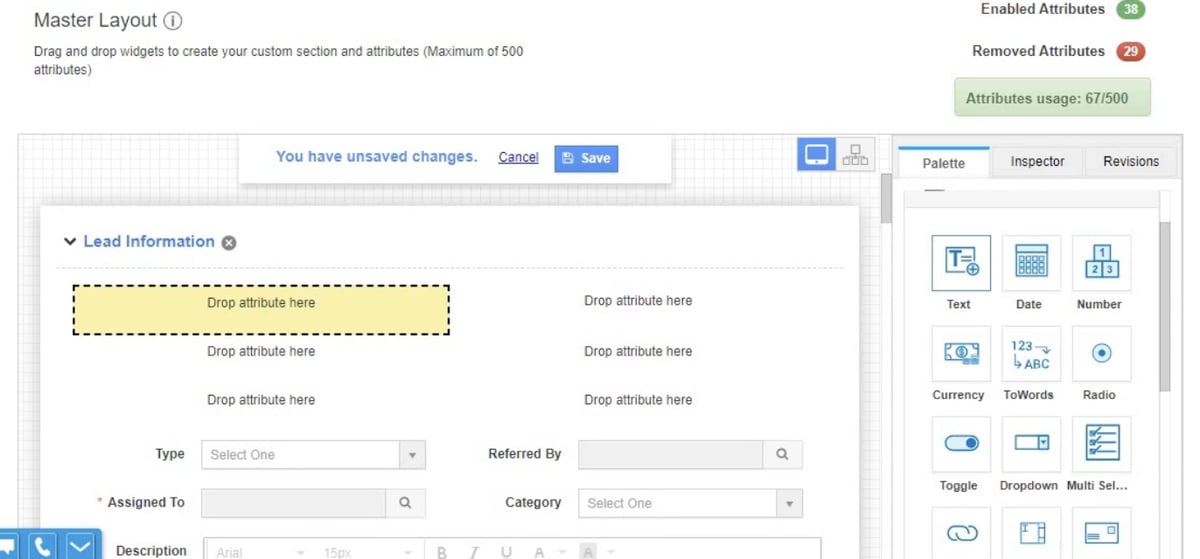
Apptivo is an account management software with lead, deal, and contact management. It includes lead capture tools like a web-to-lead form and automatic email-to-lead creation, plus it lets you convert leads directly to opportunities, contacts, or customers. You’ll also get sales tracking through a performance dashboard, analysis reports, and — at some levels — territory management.
A unique element of Apptivo is its integrations with PayPal, Stripe, and Authorize.net. You can invoice and collect payments from inside the CRM using these tools.
Features
- Custom company hierarchies
- Forms
- Workflow automation
- Loyalty management app
- Built-in proposals, purchase orders, and invoices
- Analytics
- Territory management
- Email sequencing
Pros
- Has a longer-than-average free trial
- Has helpful customer service and support, according to reviews
- Has a mobile app with a Google Maps integration for on-the-go teams
- Can accept payments via integrations with with PayPal, Stripe, and Authorize.net
Cons
- Requires more setup for some integrations than other tools
9. Calendly
Business pricing: Starts at $12 a month
Free trial: 14 days
G2 rating: 4.7/5
Calendly is a different type of account management software than others you’ve learned about here. It’s not where you go to manage your territories and sales teams or analyze your pipeline. Instead, Calendly is a scheduling automation platform that helps mid-market and enterprise teams standardize and scale scheduling across the business.
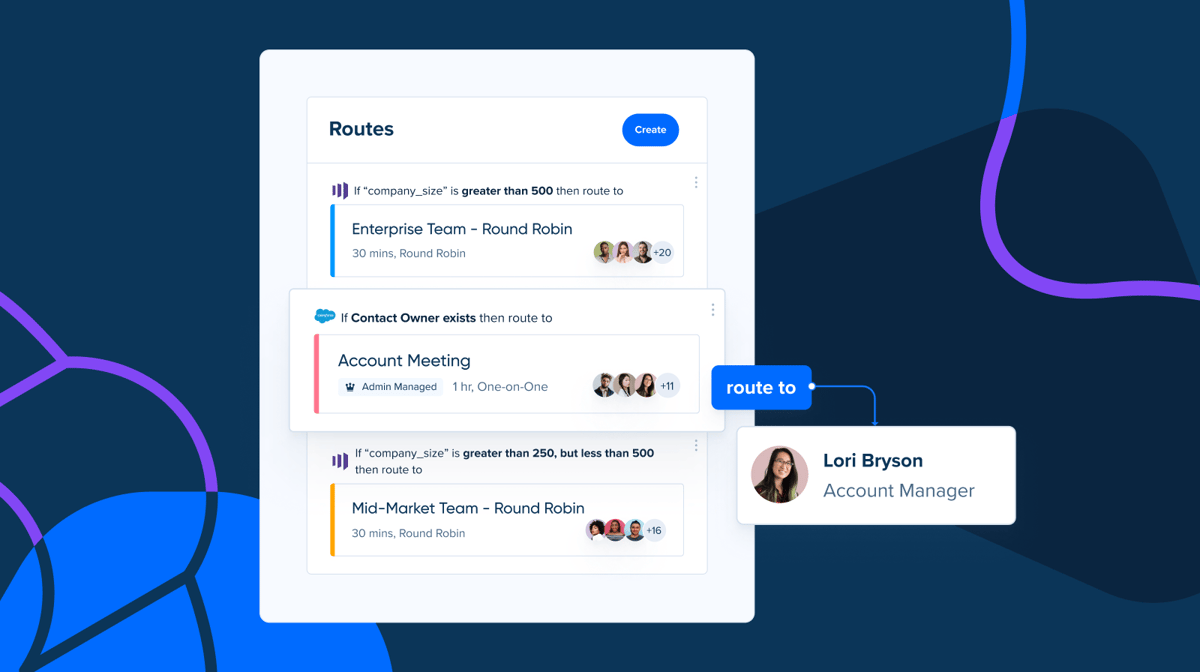
Calendly Routing automatically matches form submissions with the right point of contact so current customers can schedule time with account managers without back-and-forth emailing. Calendly automates meeting reminders and follow-ups to standardize the customer experience.
Calendly also integrates with 100+ apps, including Salesforce, HubSpot, ActiveCampaign, and Zoho. Account managers can seamlessly schedule and track meetings without manually moving data between apps.
Features
- Booking pages
- Salesforce routing with real-time account owner lookup for scheduling
- Form builder
- Custom meeting distribution rules like first available or equal distribution
- Automatic reminders via email or SMS before and after appointments
- Time zone detection
- Multi-calendar integration
- Analytics
Pros
- Has an extensive list of native integrations to fit into your current workflow
- Lets you customize calendar preferences like meeting limits and buffers
- Supports the customer experience with easy-to-use booking and pre- and post-meeting automations
- Standardizes workflows to ensure a consistent team effort and customer experience
Cons
- Account management isn’t Calendly’s primary purpose, so you’ll likely need to integrate it with whichever account management tool you choose
- Routing via Salesforce account ownership is only available on the Enterprise plan
Want to learn more about how Calendly helps account managers boost customer retention, streamline meeting management, and deliver the best customer experience possible? Contact our sales team.
Get a competitive edge with the right account management tool
No account management software works perfectly for every company. As you review the options presented here, think about your team’s goals and which features can help you meet them.
Account management tools help you work faster, make strategic decisions, and deliver a consistently great customer experience. The right one can turn your team into a critical success driver, with a huge impact on customer experience and revenue.
Remember that you can integrate different tools for a richer experience. For example, you can connect your CRM to Calendly to create a rich account management and communications experience. Get started with Calendly today and find out how much more you can accomplish.
Get started with Calendly
Ready to make meetings easier than ever?